Showing posts with label Stereo 3D. Show all posts

Thursday, June 7, 2012

Stereo Photo Maker

Stereo Photo Maker displaying picture of Molly Brown's home.
Last week, I covered methods to capture Stereo 3D images. Once you begin creating your own 3D images, you will need Stereo Photo Maker. Stereo Photo Maker is part of a suite of free software that has been developed by Masuji Suto for viewing and editing stereo images. There are versions available for Windows and Mac OS.

The software is very helpful for viewing 3D images because it can open all of the standard 3D file formats and display images using all of the common 3D methods. All of the 3D images that I have featured in this blog were saved by my camera as .mpo files then opened in Stereo Photo Maker to be converted and saved as stereo pairs and stereo anaglyphs.

If you are capturing pairs of images using the cha cha method, Stereo Photo Maker can be used to align your separate images into a single 3D image. You can adjust the relative sizing of the images, vertical and horizontal alignment, and rotation manually, or you can allow the software to align the images automatically.

Stereo Photo Maker is particularly useful for cropping which would be quite difficult otherwise because the crop has to be applied equally to the left and right image views. I find it helpful to capture most scenes zoomed out slightly then crop down to the best composition in the software.

Next week we will cover the stereo window and composing to avoid window violations.


Thursday, May 31, 2012

Photography in 3D

Roof of the Walt Disney Theater
A couple of weeks ago, I uploaded posts on the basics of stereoscopic 3D imaging and ways to view 3D content. 
  
While watching 3D movies, and viewing 3D pictures on the web can be enjoyable, it’s even more fun to create your own 3D content. Here are three ways you can create 3D photos yourself.


The simplest way to capture 3D is using a 3D camera which has two separate lenses and two separate image sensors. I use a Fuji Finepix Real 3D W1 which is as easy to use as any standard point and shoot camera. Because the two lenses zoom synchronously, I am able to compose scenes and capture them without any concern about alignment between the left and right frames. The Finepix can save each image as a .mpo file which is a popular 3D image format or as a 2D .jpg file. Both the left and right frames are captured at 10 megapixels.

If you prefer to use your DSLR camara, you can convert it to 3D by using the Loreo Lens in a Cap. The Lens in a Cap uses two lenses, 90mm apart, to capture a left and right view side by side on a single frame. Images captured with the Loreo Lens in a Cap can be printed and viewed using the Loreo Pixi viewer without any additional image processing. In my experience, the Lens in a Cap worked perfectly when I could position the camera at the right distance from the subject. Too often, the fixed focal length on the lens made it difficult to compose the image the way I wanted.

You can also capture a stereoscopic 3D image with a standard 2D camera and lens using a method called “cha-cha.” To cha-cha you stand with both feet together and frame your scene in the viewfinder and capture the left image. Then you slide your right foot about 90 mm to the right, slide your left foot next to your right and capture the right image.  You need to do this dance without moving the camera up or down or rotating it in any way. If you successfully captured the images in alignment, you should be able to print each of them side by side and view them in stereo using a Loreo Pixi viewer.

Why not give it a try?


Fuji FinePix Real 3D W1
Loreo Lens in a Cap


Thursday, December 1, 2011

Hartsburg, St. Augustine and Daytona in 3D

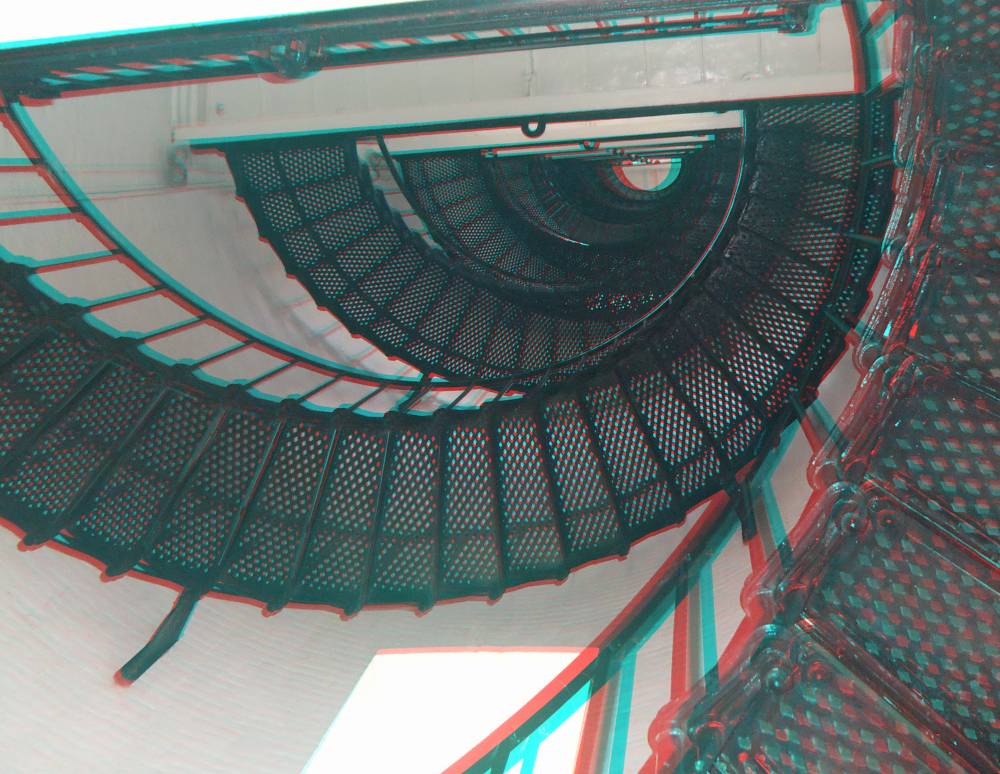
It has been a number of weeks since I posted any stereoscopic images so it seemed like a good topic for the week.  Here are a few images captured over the last few weeks in Missouri and Florida. As usual, I have uploaded each image as a stereo pair and a red/cyan anaglyph so you can chose your favorite viewing method.

First two images are from Missouri.  The pumpkins were on display at the Hartsburg Pumpkin Festival and the barn is in a field near Hartsburg.


The next few images were taken in St. Augustine Florida. I particularly like the receding depth of the circular lighthouse staircase.


These last two images were captured in Daytona Beach, Florida.  It is interesting how the water in the fountain appears to float in the air.


Have you experimented with 3D photography? 

What is your favorite method of viewing 3D images?


Sunday, January 30, 2011

Art in Ice (3D)

While people in many parts of the country fight cold weather and struggle to deal with snow, the people of St. Paul, Minnesota celebrate it with a Winter Carnival.  They have been celebrating their Winter Carnival since 1886!

Here are some stereo 3D images of the ice carvings in St. Paul's Rice Park and one from the Orchid show at the Conservatory.


All images were captured with a Fujifilm FinePix Real 3D W1 camera and converted to pairs and anaglyphs with Stereo Photomaker.